


Comparing Indoor Training Platforms: Zwift vs TrainingPeaks Virtual
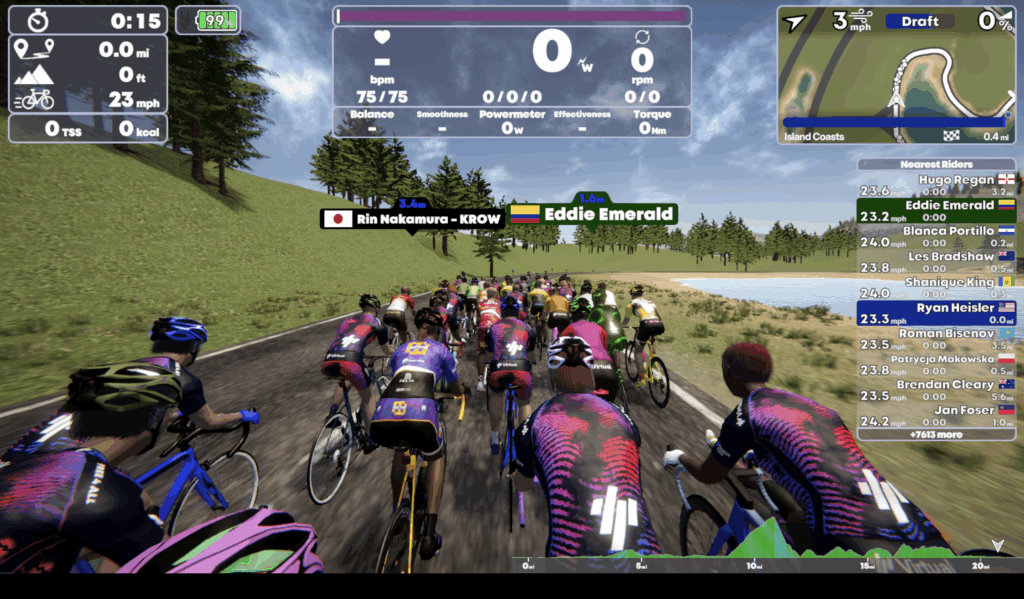
Let’s face it: it’s peak indoor training season for those of us in the northern hemisphere. We are, for the most part, faced with limited daylight, cold and wet weather, and are in need of packing in workouts around the rest of our lives. It means we’re frequently resorting to those indoor caves to find our time to, at the very least, ride a bike.
Thanks to our virtual indoor cycling platforms, that has become less of a pain (in some ways) than it has ever before. Since Zwift essentially democratized smart indoor training with virtual worlds a decade ago, the virtual cycling platform vertical has seen numerous upstarts and competitors join the fray. One of the latest entrants in the field is TrainingPeaks Virtual. Born from the acquisition of indieVelo, TrainingPeaks Virtual is embedded within a subscription to TrainingPeaks Premium and offers a similar set of features to Zwift.
Namely, here’s what TrainingPeaks claims for TP Virtual:
- Synchronized indoor rides between TP and TP Virtual;
- Connectivity with a wide variety of smart trainers, heart rate monitors, and more;
- Solo workouts, either in focus mode (data only), or virtual roads with other riders or zen (solo) mode;
- Group rides and community workouts;
- Racing;
- Real-world route uploads via GPXplore
In fewer words: it’s trying to be pretty much everything that Zwift is. And, in some ways, have options on the table (in focus mode or with GPXplore) that are things Zwift just does not offer. With TrainingPeaks Premium memberships also currently on sale for 20% off, TP Virtual will cost you nearly 50% less than a Zwift annual membership.
Naturally, that means a comparison is in order. And how you wind up deciding which platform is for you ultimately comes down to a simple question: why are you riding indoors?
TrainingPeaks Virtual: For Real World Simulation or the Data Obsessed
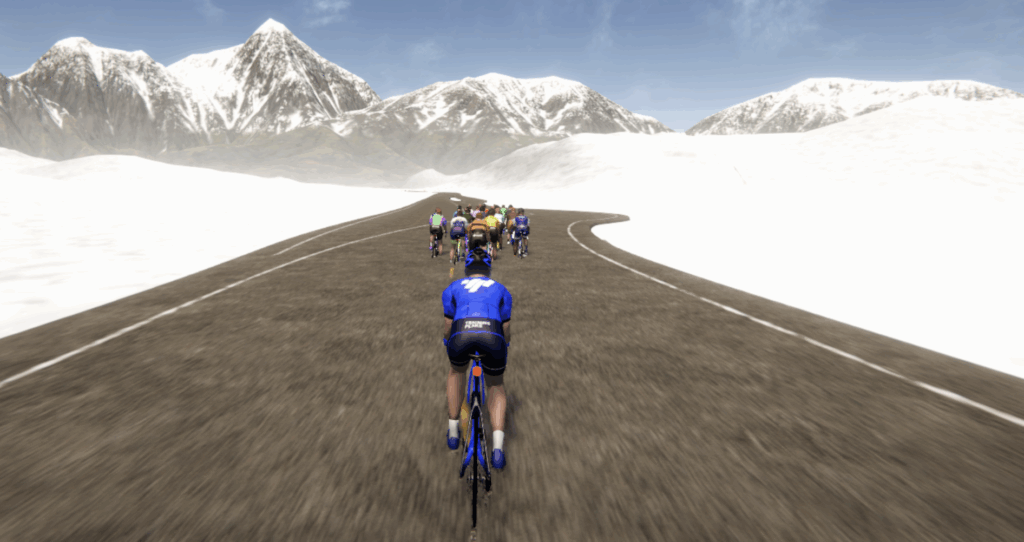
Pros: Comes closest to mimicking outdoor riding, data rates, that price
Cons: Graphics are 2019 Zwift era, fewer events, Hub app is far less seamless to Companion
Verdict: Unless you miss certain gamification metrics, pay for Premium and use this.
When TrainingPeaks acquired indieVelo back in 2024, it inherited a pretty robust platform. TrainingPeaks has since fully baked it into the entirety of the TrainingPeaks ecosystem, which means that you have something that reliably works every time you fire it up, and there’s no additional connections or messiness that comes when you want to ride a structured workout that your coach (or training plan) has written for you. I know that I have driven many a coach nuts by *ahem* not sticking to the workout as intended, and this is one method to avoid that.
For those of you who’ve been around since staring at graph lines in RacerMate software while riding a CompuTrainer and miss those simpler times, fear not: you have that opportunity available to you in Focus Mode. Black screen, data graph, and the world’s your oyster. If all you’re going to do is throw on a movie or binge-watch a series on Netflix while you’re training, this is about a perfect a setting as possible. And, please note: TrainingPeaks Virtual auto-sets to turn game mode on your preferred computer or tablet running it; that means there’s no toggling between screens here. It’s not like Velocity, where you overlay data on a streaming service. It’s separate.
You can also get much of the same set-up, just with virtual scenery, in Zen Mode. You can explore the virtual world in its entirety without any other riders distracting you. That being said, I’m not entirely sure you’d want to go that route, as TP Virtual’s graphics are a step or three behind that of Zwift. As I was riding yesterday, all I could think of were the launch games for Sega Dreamcast way back when; that’s about the quality of graphic we’re talking about here (and now I want to play Crazy Taxi).
Perhaps the single greatest innovation TP Virtual has going for it is the ability to ingest real-world routes and ride them in-game via GPXplore. As we covered during GPXplore’s launch, it allows you to take any GPX file and turn it into something with a display in game, and you can then invite as many of your closest friends as you’d like to that ride. It’s perfect for people who like to preview the course of their next race, especially if it falls outside of the IRONMAN / IRONMAN 70.3 window (as most of those routes are in Rouvy, with better graphics associated with them). But, for instance, if I’d like to preview the route I’m going to take to ride up to a lodge on Mount Hood and back from my house, I can do that.
I also found that the overall physics engine of TP Virtual did a good job of replicating being outdoors. Crucially, it does a very good job of adding the impact of virtual wind into the equation, both riding solo as well as exposure to wind gusts, making the road feel more accurate. There’s also some additional data sampling and graphing that Zwift does not do, like showing torque values along with cadence and power. It simply seemed more robust on that front.
That isn’t to say that TP Virtual is perfect. The number and frequency of large scale events on offer is significantly lower than that of Zwift. For instance, I rode a race on Zwift on Monday, followed by joining a TP Virtual race yesterday. The total number of competitors in the TP Virtual race did not match the number of riders in my category alone on Zwift. You also can’t join a race at the last minute; TP Virtual takes that moment to organize riders into starting pens. Unfortunately, those pens might not be the best one for you; I was simply able to solo ride away from the field to “win” my race. That’d never happen in Zwift.
There’s also the TrainingPeaks Hub app, which is a rough equivalent to Zwift’s Companion app. It’s how you communicate with fellow riders, as well as how to try to preview events. And, frankly, it leaves a bit to be desired. In the events I sampled, there were very few, if any, riders using the app. It meant that, if you were trying to make a move with a fellow rider during a race, you had to hope that they just went with you (and not someone else). It’s also just somewhat spare on information regarding starts, event type, or categorization.
These things will likely come with time. But I also think that’s not the real power behind Virtual. The value, in my opinion, is for that coached or training plan oriented athlete who has specific tasks to perform. If you’re already paying for Premium, why would you pay more for a service to take those workouts and put them in a virtual world when you have a free one right here? That structured training athlete should have no problem canceling a Zwift membership and riding on Virtual instead.
Zwift: For Gamification
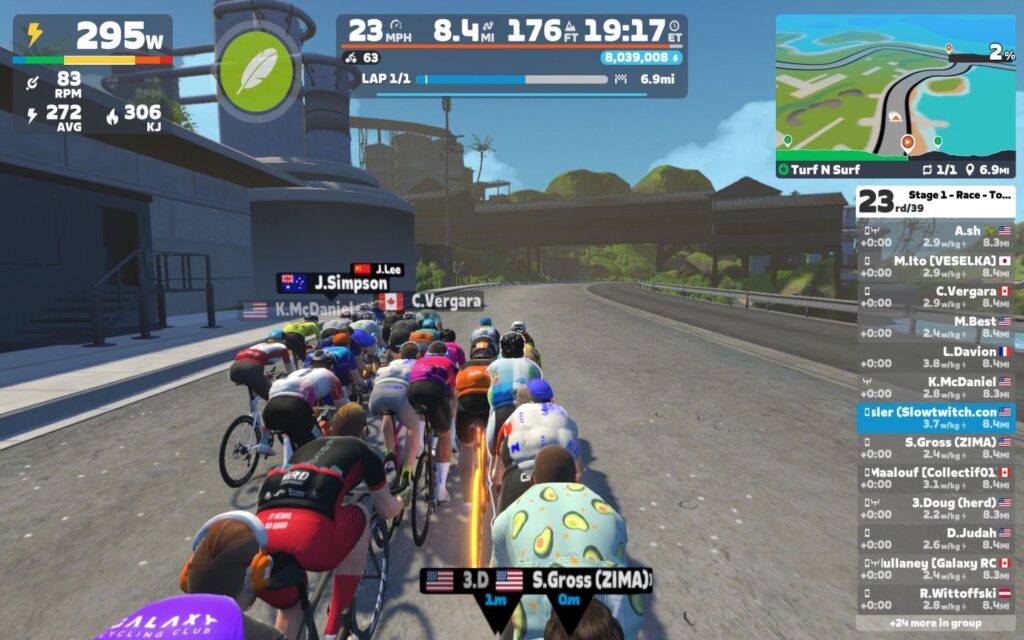
Pros: Still the one to beat for mass virtual racing, gamification across the entire platform, robust community, best graphics
Cons: It costs how much?!?, required Zwift proprietary controllers for enhanced experience
Verdict: For the gamers amongst us.
When Jarvis Island first popped up on the Slowtwitch Forums in the early 2010s, it was trying to fill a specific void: namely, take advantage of some of the new smart trainers on the market and give them a virtual place to ride. As Jarvis Island eventually became Zwift, the platform started evolving, with new roads, new training methods, new group rides, and eventually, racing. Zwift also started to dabble in further customization with avatars, badges to earn, levels to achieve and aspire to.
Here in 2026, Zwift has fully embraced its identity as a gaming platform. There are challenges to unlock, XP to earn, and monthly competitions to be a part of. Along the way, certain elements of the platform have fallen by the way side; many large-scale community events, including those that were run by Slowtwitch at one point, either are now wholly operated as part of Zwift series, or have gone elsewhere. That doesn’t make it better or worse; it’s just, well, different.
As an online game, then, Zwift excels at it. Route badges keep people coming back for more, and with road expansions, it’s always a moving target. Zwift’s expanded the number of XP levels to earn, meaning it can take years of riding to reach the highest experience levels in the game. And graphically, it is miles ahead of where other indoor training platforms sit, especially with the level of detail needed to know precisely within a group your avatar might be.
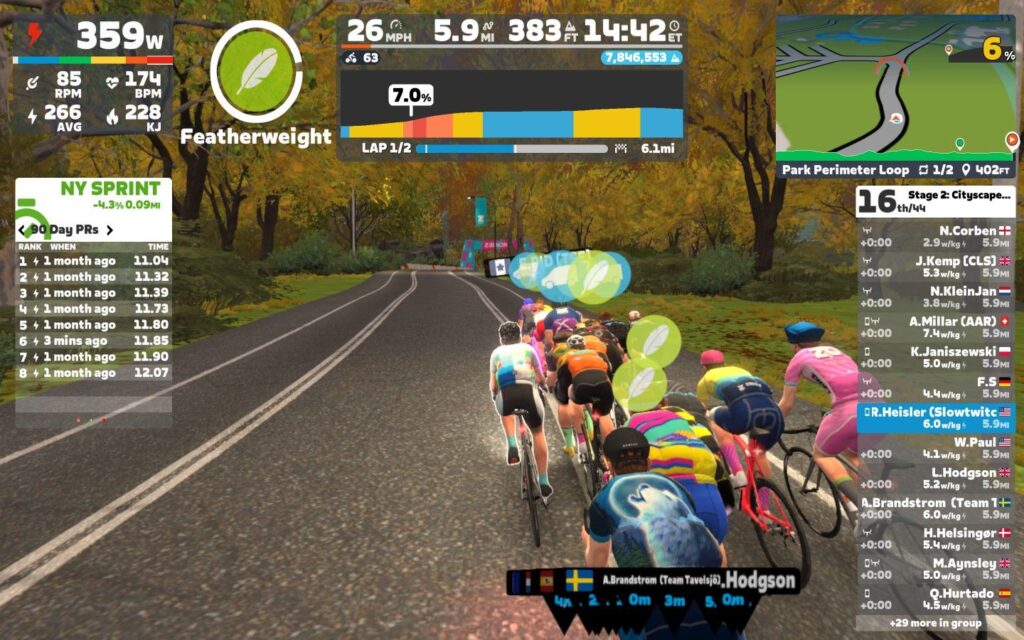
Being the oldest platform also gives Zwift advantages when it comes to racing. The move from FTP based groupings for races to Zwift’s calculated racing score has made events vastly more competitive and realistic. There are still plenty of unique elements to Zwift racing; namely, there is never such thing as a neutral start, and you can almost always guarantee where the “winning” move of the race will take place when reviewing a map. But it’s all, inherently, part of the game.
That said, though, there is still some slight wonkiness to the physics engine. For instance, the required efforts to pull away solo from a large group are much, much higher than in real life; we’re talking multiple watts per kilo higher than a steady group effort in order to pull away. And, of course, good luck staying away. The draft effect is simply too much to ignore.
Also, to truly excel at Zwift racing these days, it requires more investment into the gaming side of the platform. Steering has become a greater and greater required element in the game in order to ensure you stay following the right wheel. Anyone who has raced on Zwift knows the pain of getting attached to the “wrong” rider at a critical moment in the race and missing the winning move, or getting punted out the side of the draft when you’re producing the same power to hold the line you have. To fix that, you’ll need to shell out $50 for the Click and Cog upgrade, or one of the compatible turning blocks.
And then there’s the price. Zwift membership is $19.99 a month, or $199.99 annually. That doesn’t include any subscription you might have to then analyze your data on top of it. If you have both a Zwift membership and a self-paid TrainingPeaks Premium account, you’re now paying more than a Tier 1 IRONMAN 70.3 entry for your indoor riding. Whether that’s worth it is ultimately a question for you as an individual athlete.
For me, my virtual riding existence is almost entirely in service of going racing. When in doubt, I’m going to find a race to hop into; I first and foremost enjoy it, and secondly, I find I respond pretty well to the frequent intensity that only comes from hitting a start line. That means, at least for now, you can continue to find me on Zwift. But for those who are hitting structured workouts, or just want a platform to control the trainer while you throw on Stranger Things for a re-watch, you should give TrainingPeaks Virtual a shot.
Speaking of: TrainingPeaks Virtual is available to all users until Sunday, January 11th. After that, you’ll need a Premium account to access it; the 20% off sale on annual memberships of Premium also comes to a close on Sunday.
Tags:
Indoor TrainingTrainingPeaks VirtualWahoo FitnessZwiftRelated Articles:



Continue the discussion at forum.slowtwitch.com
34 more replies



Would be nice if Rouvy and Mywhoosh were here too. Rouvy has real world courses and partnered with IM and challenge. Unfortunately the racing scene user base not there.. biggest races once a week, mainly older riders who are in for the scenery. Mywhoosh is free and a cartoon world like zwift, so I just use it in the summer cause I can’t handle the cartoon life for long, so I opt to pay for rouvy in the winter
No virtual shifting in TP-V, so it’s a non-starter for me.
Wanted to compare the two that are most similar in terms of feature set.
@Callin yeah, I thought about that. Especially with the cost of, say, AXS cassettes these days. But I still prefer “real” shifting versus virtual, and will eat the cost of that as “part of doing business.”
I prefer that too, but I’m on different groupsets between two bikes (shimano HG 11 vs sram XDR, flattop 12) so the cog + remote just solves all the problems
Rouvy made a hack to get virtual shifting to work, but requires certain trainers for it to work.
TP Virtual does have virtual shifting by keyboard or the Hub app. There is also a third party app that allows you to use virtual shifting on TP-V with Zwift controllers or your Di2 & AXS levers. George Gilbert confirmed the app works well with TP-V. I haven’t tested it yet.
I use virtual shifting on TPV with a 2 button usb keyboard strapped to my hoods. It works well but I have to admit I don’t like how virtual shifting is implemented in TPV. The change in resistance is way too oversmoothed in my opinion.
The review states that there are way more populated races on zwift versus TPV. I believe this is a misleading statement. I have moved from zwift to TPV 3 months ago because the zwift races are sparsely populated outside of big events. But life with 2 kids means I can’t commit to any specific race times. I can schedule a race on TPV at any time and have 50 bots in with me. They are typically much more aggressive than zwift racers and make the races much more exciting. Also the fact that there is auto braking and cornering means TPV races are much more realistic. Crit races are so hard with the accelerations out of corners required. But if racing against other humans is important to you and seeing people chat in races, then the original review is correct, the number of big races is small.
I’d also recommend people google TPV Career Mode. It is a side project being created by the community. I have just completed one race under it and am really excited to see how it develops.
Finally I’d recommend people try Biketerra. This is the gold standard in terms of uploading your own GPX in my opinion. Far superior to the old RGT or current TPV. Very small community currently though.
From where I stand, Zwift is now redundant and I cancelled my subscription and moved to Rouvy. The structured sessions I do in ERG, and those I now do in TP Virtual which is almost identical to Zwift and included in my Trainingpeaks subscription. Plus TP virtual never fails to sync my daily sessions. For longer rides at the weekend I use Rouvy, have been doing a lot of Ironman courses with my Kikcr Climb, I prefer real shifting and hands down better experience than Zwift for a free ride.
I been doing this for 15 years this tri stuff…. And all I have ever used is TrainerRoad and YouTube or movies…..hell I was using a kk road machine for 10 of those years. I think at 45 I’m now considered a technological dinosaur. Zwift etc looks complicated
IMO, that makes you a nearly perfect TP Virtual customer.
–No 3rd party integrations necessary, just connect a smart trainer and go
–Structured workouts are right there
–Focus mode is pretty much the old TR / SUF data screen in front of you
–Easy analysis in TP
Zwift isn’t hard. But for coaches and their athletes, especially if there’s a lot of structured workouts going on? No brainer.
I still love Zwift for what it is, but because it’s gone so far down the “game” aspect, it’s opened up space in the marketplace for something a little more focused on “just” training.
If you’ve never had a Zwift race where there’s an attack on literally every climb or sprint point, sure. Some have settled down a bit but there’s a reason why it used to be called the “Killer Bs category” – it was often harder than the A category races just due to the relentless attacking.
But I also have zero interest in pace bots, or fake riders, which is where the concept of “create your own event” feels very artificial.
To be clear, I am not saying that zwift races aren’t hard or aren’t good just that TPV are more like real life. I find zwift races to be about just clinging to the group for as long as possible and then a sprint. Breakaways are rare and usually mopped up by the bunch so you are best just staying in the bunch. Surges happen in predictable places. TPV bots attack, bridge and breakaways happen anywhere.
In case any zwift riders read your last comment and misunderstand. TPV bots in races are not pace bots. They ride very dynamically.
I get it that you don’t want to ride with “fake” non-human riders, but at least what you see with the bots is what you get. Whereas zwift races are populated with “fake” riders on inaccurate trainers/spin bikes or outright cheaters (weight doping).
If I had my way I would prefer ride with a big human field rather than bots. But the bots are invaluable for me at the minute as I can get a quality race whenever I want.
I can’t believe I pay $200/year for Zwift when I get TPV “included,” and I feel totally vain for holding this opinion, but I just can’t get over the difference in UI, graphics, and character animations between these platforms. To me it’s like going from a PS3 era video game to Quake.
The UI is just totally unintuitive to me and looks busy as hell. It looks like a lot of late 90s websites developed in Dreamweaver. There’s a dozen menus with buttons and options everywhere, and text covering the entire screen, just to get into the workout.
Once you’re in the world, it feels like you’re in an old Everquest map with basic terrain and sparse trees. The movement animation looks quite clunky/robotic as well. The animations in Zwift aren’t perfectly realistic, but they feel more fluid to me.
I say this as someone who grew up playing Quake, Unreal Tournament, SNES, and PS1 games and doesn’t really play any modern games. I’m not one who values graphics over everything else.
Zwift will pull your scheduled and structured workouts directly from trainingpeaks. How is this more of an issue for coaches and their athletes?
I mean that with TP Virtual, there’s no hooking it up, or praying that the integrations don’t go down (which, if you’ve been on the Zwift forums before, you know there’s occasional hiccups). It’s all right there. And you also don’t have to necessarily go through the whole “let me be sure to schedule the workout I want for today because my schedule changed and I may only have time for X”. You can do it all in Virtual.
I’ve definitely had to recover some .FIT files in my day due to Zwift barfing on itself.
And…again…it’s already included in your Premium subscription.